Instagram Carousel Posts: What They Are & How to Create One in Minutes
Instagram carousel posts are generating the highest engagement rate in comparison to other content formats. This post will help you learn how to use them to grow your audience.

If you’re creating content for Instagram this year, you’ll want to include instagram carousel posts in your strategy. They're one of the most effective ways to stop the scroll and boost engagement, especially on Instagram.
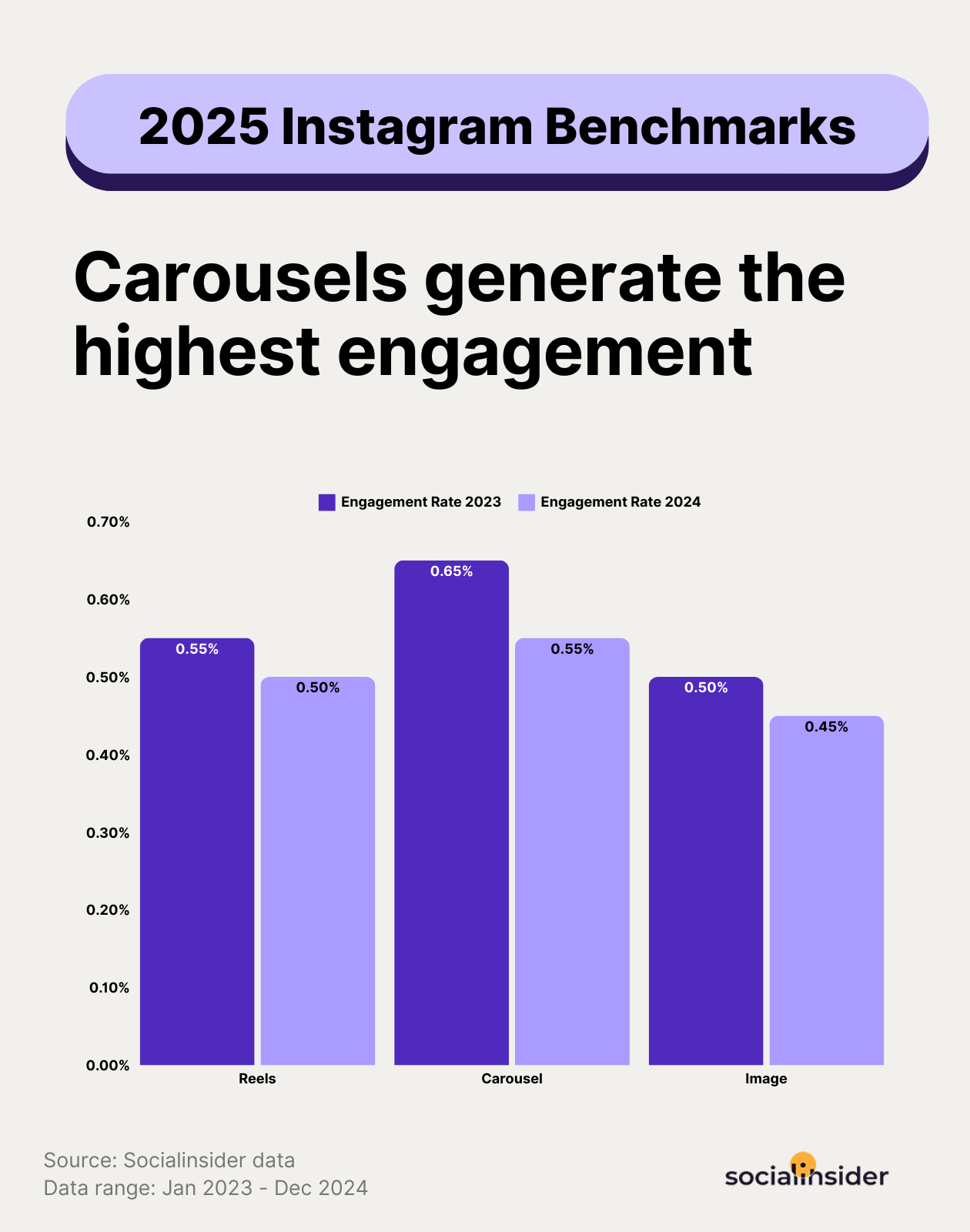
In fact, carousel posts are generating the highest engagement rate year over year in comparison to other content formats like reels and images, and get the highest number of saves, according to socialinsider.io.
Let’s break down everything you need to know to get started with your first instagram carousel.
What Is an Instagram Carousel?
An Instagram carousel is a single post that contains multiple images and/or graphics users can view by swiping (or on a desktop, clicking) left through the slides. It’s the social media equivalent of flipping through a newspaper or magazine article.
In an instagram carousel post, you can include:
- Photos
- Graphics
- Text-based slides
- A mix of all three
Each Instagram carousel post can include up to 20 slides, making it ideal for education, storytelling, or showcasing products and services.

Why Instagram Carousels Work So Well
Instagram carousel posts consistently perform well because they encourage user interaction. When someone swipes through, pauses to read, or goes back to review a slide, Instagram sees that as engagement. The more engagement your post receives, the more the algorithm will push it.
For business owners and entrepreneurs, carousel posts on Instagram are especially helpful because they allow you to:
- Teach without overwhelming
- Break ideas into simple steps
- Show expertise in a digestible way
- Keep people on your content longer
- Share valuable content that builds authority and trust
In short, a well-designed instagram carousel allows your audience to slow down and delve deeper into your content and develop a richer understanding of (and hopefully, excitement about) your brand.
Common Types of Instagram Carousel Posts
If you’re wondering what to post, here are a few beginner-friendly ideas that work beautifully as carousel posts Instagram:
- Educational tips (one tip per slide)
- How-to guides
- Before & after transformations
- FAQs or myths vs. facts
- Step-by-step processes
- Mini blog posts
- Storytelling or personal lessons
Think of a carousel Instagram post like a short slideshow that teaches one clear idea in a concise, eye-catching way.
Best Practices for Instagram Carousel Posts
To get the most out of your Instagram carousel posts, keep these best practices in mind:
1. Start With a Strong First Slide
Your first slide is everything. Use a bold headline, question, or promise that makes someone want to swipe.
2. One Idea Per Slide
Avoid cramming too much onto one image. Simple, scannable slides work best—especially for busy audiences.
3. Create a Flow
Each slide should naturally lead to the next. Think of it like turning pages in a book.
4. End With a Clear Call-to-Action
Your last slide should tell people what to do next:
- Save this post
- Share it
- Comment with a question
- Follow for more tips
This helps your carousel post Instagram perform even better.
How to Post a Carousel on Instagram
Posting a carousel on Instagram is easier than it sounds:
- Tap the “+” icon in Instagram
- Select Post
- Tap “Select Multiple”
- Choose up to 20 images or slides (though carousels with 8-15 slides generally perform better, depending on the topic)
- Arrange them in order
- Write your caption and post
And voila! Your social media game just got a whole lot stronger.
Tools and Templates to Make It Easier
You don’t need fancy software to create beautiful carousel posts on Instagram.
Popular beginner-friendly tools include:
- Canva (best bet for beginners, great templates for carousel Instagram posts)
- Figma or Adobe Express (for those with more design experience)
- Google Slides (surprisingly effective if you’re looking to keep it simple!)
Using templates saves time and helps your content look consistent and professional regardless of your experience level with design.
TL;DR
If you’re an independent business owner or entrepreneur looking to grow on Instagram without burning out, Instagram carousel posts are a fantastic place to start.
They’re flexible, beginner-friendly, and leave lots of room for creativity. They’re ideal for teaching, sharing, and building a community around your business, one swipe at a time. Start simple, focus on how you can help your audience, and let your confidence grow with each Instagram carousel you create.
You don’t have to be perfect, you just have to get started. Here are some examples to get the inspiration flowing. 💛
Plus, here’s a handy prompt you can give Chat GPT to help you create your first set of slides:
“Give me a few ideas or headlines for an Instagram carousel post I can make on “[insert your niche or topics of interest]”, keeping in mind that my target audience is [insert your target audience].
Write out at least [insert the number of slides you want] slides worth of content for this topic “insert the topic or headline]” keeping in mind we’re making a carousel post so add breaks between every slide’s content.
Include suggestions for some clever, punchy hooks to stop the scroll, as well as what kind of visuals I should include with it.”